
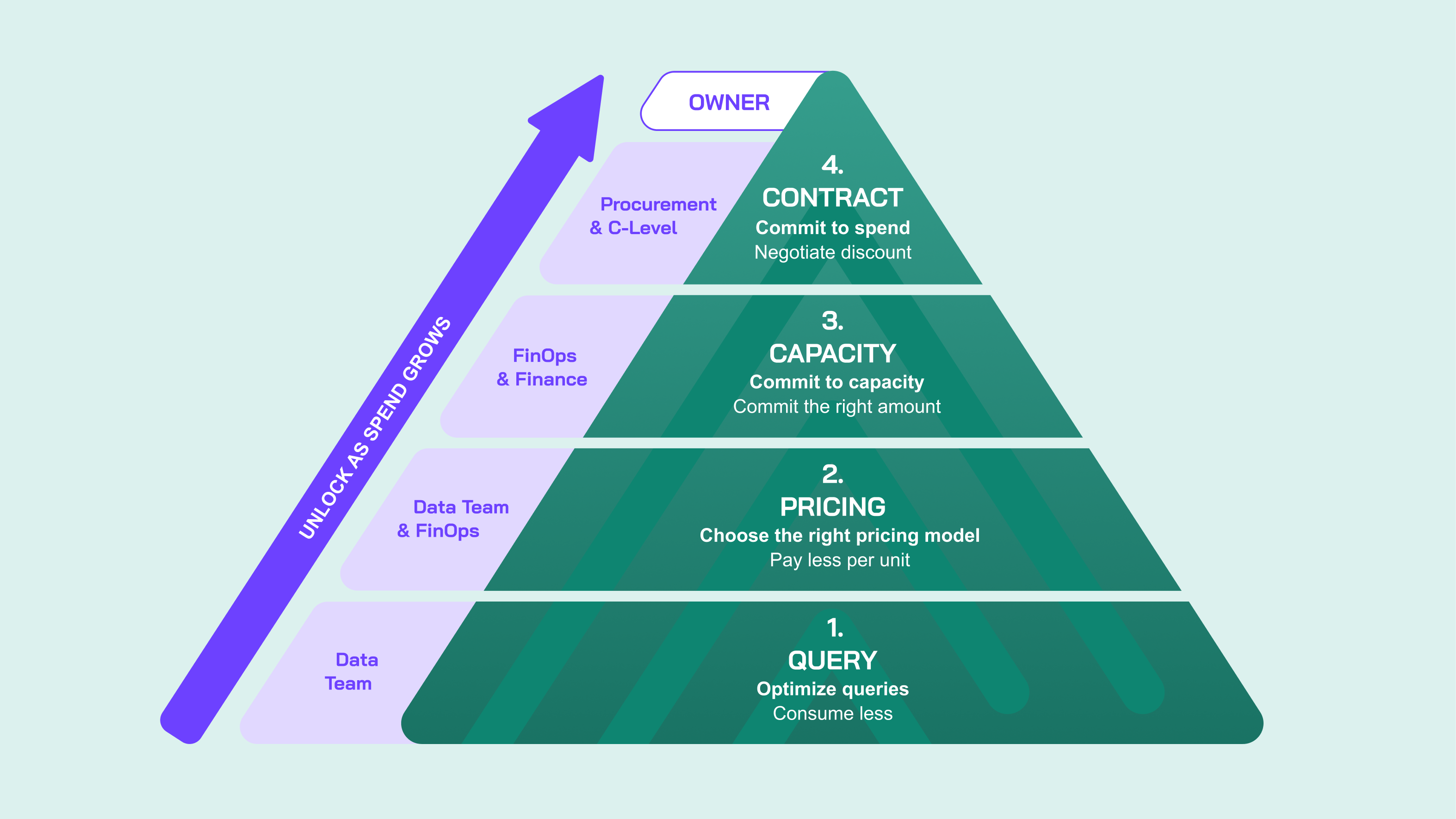
I spend most of my week talking to people about their BigQuery bill, and the conversation usually splits along the same line.
Whoever owns the cloud spend is looking at the top of the stack: committed spend, the enterprise discount, when the contract's up for renewal. Whoever owns the queries is looking at the bottom: which query is a monster, which dashboard is slow, what time of day they hit up against resource constraints. Each side is trying to impact the same number, but from totally different directions.
I'm Simon, and I have worked at Looker, at Google, and ran my own FinOps consultancy before leading our customer-facing efforts at Alvin AI, where we do one thing: automate BigQuery cost optimization. I've spent many years speaking with hundreds of BigQuery customers, and one thing is clear: when it comes to BigQuery, there is no shared FinOps vocabulary. So for purely selfish reasons I decided to put together a framework to hopefully make these conversations easier.
If you know the FinOps Foundation framework, you'll be aware it splits the discipline into domains: Understand Usage and Cost, Quantify Business Value, and Optimize Usage and Cost, wrapped in the people and processes that make them work.
Everything here lives inside that third domain. It's not a replacement for the FinOps framework and it doesn't cover allocation, forecasting, budgets or showback. It's a specialisation: what "Optimize Usage and Cost" actually means when the service is BigQuery.
That specialisation is necessary because generic cloud FinOps advice doesn't survive contact with BigQuery. "Rightsize your instances" has no equivalent here. "Buy reserved capacity" is three separate decisions. And the same query can be ten times cheaper or ten times more expensive depending on which pricing model it bills against, a category of decision that doesn't exist with traditional compute.
So: FinOps is the discipline. This is the BigQuery specific optimization layer inside it.
There's a second reason BigQuery FinOps initiatives may disappoint other than vocabulary. A team can do genuinely excellent work and costs can still go up, because any savings got cancelled out by a 30% increase in usage. This is unlike classic compute cost: run Compute Engine and your consumption is reasonably stable and forecastable. BigQuery workloads aren't: new dashboards, pipelines, and models often get commissioned faster than old ones get decommissioned, so the baseline goes up. This is even more relevant with the proliferation of agents in recent years.
In fact, you will likely have two, directly competing goals: driving adoption of your data products and reducing costs. So set achievable goals: holding costs flat while data adoption grows is still a big win.
Every dollar you spend on BigQuery compute is the product of four things: how much work you run, what you pay per unit of that work, how much capacity you've agreed to buy in advance, and the contract terms that set your rates and your spend floor in the first place. That gives you four layers to work on.
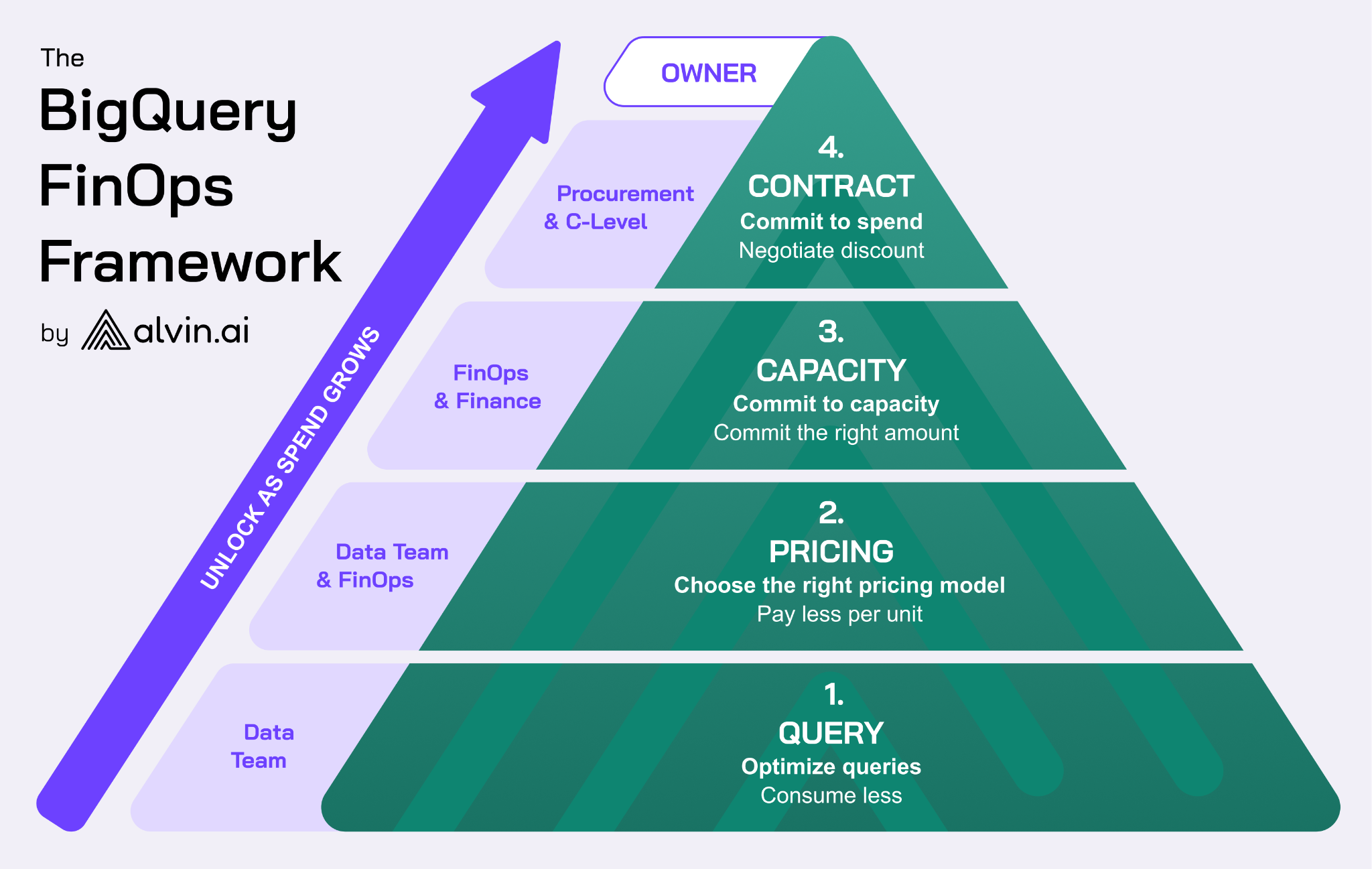
Draw those four as a pyramid, with query optimization as the broad base and your contract with Google at the very top, and that shape carries real information. At the base you're making thousands of small, reversible decisions every day, at the query level. At the top you're making one enormous decision every few years, with procurement and finance in the room. A bad query costs you money until Tuesday. A bad contract costs you money for the life of the agreement. And the pyramid isn't just about decision size, it's about when each layer becomes viable at all: Layer 1 pays off from your first BigQuery bill, but Layers 3 and 4 only become real options once your spend is large enough that a commitment or a negotiated contract are actually on the table, which is why most companies never touch the top of it.
Before we dive into the layers, let’s define a few distinct concepts that I regularly hear getting used interchangeably.
Editions are BigQuery's capacity pricing model. Instead of paying per byte scanned, you pay per unit of compute, which in BigQuery is called a slot-hour. Three tiers: Standard, Enterprise and Enterprise Plus, at roughly $0.04, $0.06 and $0.10 per slot-hour at list. Choosing editions is a pricing decision and it commits you to nothing.
A reservation is a named pool of slots inside an edition that you assign workloads to. Creating one is free. Unless you have a slot commitment, you are likely using the autoscaler to provision slots. You set the max slots, and BigQuery scales to meet demand up to that limit, and bills pay-as-you-go.
A capacity slot commitment is a contract. You agree to pay for a fixed number of slots for one or three years in exchange for 20% or 40% off. It's bought in the Google Cloud console, it cannot be cancelled, and it can only be grown or renewed at the end of the term.
So: editions is how you're billed. A reservation is how capacity is organised. A commitment is a contract about price.
Now we climb the pyramid, one layer at a time. For each: what it is, how you do it, what it's worth, and where it bites back.
Consume less.
Getting the same answer while touching less data and/or burning fewer slots.
This is by no means an exhaustive list, but if you're going to tackle layer 1, you should be thinking about the following:
Table level: Decided once, and everything else in this list operates within the ceiling these choices set.
Query level: Applied to an existing table, no redesign required.
Pipeline level: Applied to how a workload runs over time, not to a single query or table.
The relative value here doesn't track with how much attention each technique gets. Table design, partitioning and clustering especially, tends to matter most, because it sets a ceiling on every query that ever runs against that table; get it wrong and no per-query fix fully compensates. Per-query techniques compound in a different way: each one might only shave a few percent off a single query, but a query that runs every ten minutes for two years multiplies that saving many times over, which is why the least glamorous fixes are often the largest in dollar terms.
The clearest evidence we have is for caching specifically, since it's the easiest of these to isolate and measure. In one Looker environment we took the cache hit rate from about 5% of queries to nearly 50%, which removed roughly a third of that workload's cost without touching a single dashboard. One caveat, though: a metric like cache hit ratio can improve without the bill actually moving, so tie whatever you're measuring to a dollar figure before calling it a win.
Pay less per unit.
Not touching your SQL at all, and instead changing which pricing model each query bills against.
The core mechanic: on-demand bills bytes scanned, capacity bills compute consumed. Every query has its own answer to which is cheaper based on its characteristics, and the same query can come out many times cheaper on one model than the other depending on whether it's scan-heavy or compute-heavy.
In practice, a human doesn’t choose a pricing model query by query. You either run a project, folder, or organization on the default on-demand billing model, or assign it to a reservation on a given Edition. That's the lever: which project a workload lives in determines which pricing model it bills against, which is also why splitting workloads across projects by pricing model is the common (if blunt) way teams manage this manually. BigQuery does support a per-job override, but it's difficult enough to maintain that we haven't seen a company sustain it at scale.
So there are three moves: on-demand to Editions for scan-heavy, compute-light work; Enterprise to Standard, exactly a third cheaper whenever the workload doesn't need anything Enterprise-only; or Editions to on-demand, rarely discussed but frequently correct for compute-heavy, scan-light work.
The gap between models is often dramatic and can run either way. My colleague Paul ran three real query shapes through all three pricing models in How to Mix BigQuery On-Demand and Slot Pricing in Practice: a BI query costing $0.061 on-demand ran for $0.0013 on Standard, roughly 47 times cheaper; a heavy pipeline query dropped from $25.00 to $0.50; a compute-heavy query went the other way, at about $0.030 on-demand against $0.20 on Standard, seven times cheaper on-demand. Roughly, across the environments we see, moving every workload onto the right pricing model can save somewhere between 30% and 70% of variable spend. Our reMarkable case study is a good example: 60% off their dbt workloads, almost entirely from putting each query on the right pricing model rather than from rewriting anything. Aiven landed at 45% for their pipelines, and LS Direct at 50% across their entire compute bill.
Commit the right amount.
Deciding how much capacity to buy in advance, in what form, and whether you're using what you already bought.
A capacity slot commitment is bought in the Google Cloud console: you choose an edition, a number of slots, and a one- or three-year term, for a 20% or 40% discount off that edition's on-demand rate. It attaches to a reservation the same way autoscaled capacity does, so nothing changes for the workloads running against it. A spend-based CUD is bought the same way, but commits to an hourly spend level rather than a slot count, at a lower discount (10-20%), and applies regardless of which edition or region the spend lands in.
Most BigQuery customers have no slot commitments, and plenty of large ones don't either. Heavily committed organisations are probably under 10% of the customers we see, and if you spend a few thousand a month, the correct decision is almost certainly not committing at all. Martin's Decoding BigQuery Capacity Commitments and CUDs covers the mechanics and worked examples, including why "average my usage and commit to that" fails.
Where a commitment does make sense, it comes down to an exact break-even. Assuming the workload needs Enterprise: a 3-year commitment ($0.036/slot-hour against a $0.06 list rate) breaks even above 60% utilisation, a 1-year (at $0.048) above 80%. If the workload doesn't need anything Enterprise-only, the real alternative is Standard at $0.04 with no commitment available; against that, the 3-year break-even rises to 90%, and the 1-year can't win on price at all.
Commitments don't have to cover your whole footprint, either. Commit only the slice that clears break-even (your demand floor, not your average) and let the rest autoscale. A reservation running 2,000 slots for eight hours a night and 800 for the other sixteen has a floor of 800. Use the average of 1,200 and it sits idle for two-thirds of the day.
A spend-based CUD trades a smaller discount for flexibility. A slot commitment is a bet that your setup, Edition, region, workload mix, stays the same for the term; get any of that wrong and you're stuck with capacity you can't use. A CUD only commits you to a spend level, so it doesn't care where that spend lands, and it's available on Standard, where slot commitments aren't. The lower discount (10-20%, against 20-40% for slots) is the cost of not having to predict your setup that far out. Either way, check with your account team exactly which SKUs the discount applies to before you sign; it varies, and it changes the arithmetic above.
Negoatiate discount.
The spend commitment and discount structure you've negotiated with Google, which sets your unit rates and puts a floor under your total spend.
You don't tune this layer query by query. It's negotiated, typically every one to three years, with procurement and finance in the room, not the data team. Two things come out of that negotiation: the unit rate you pay per SKU, and a total spend commitment, usually across all of Google Cloud rather than BigQuery alone, in exchange for the discount. BigQuery might be a small slice of that commitment or most of it, depending on the rest of your Cloud footprint.
Your actual rates change conclusions from Layer 2. If your SKU-level discount on Enterprise is deep enough, Enterprise can end up cheaper than Standard, at which point staying on Standard means paying more for fewer features and a lower reservation cap. Layer 2's pricing analysis is built on list prices and misses this completely, so incorporate your actual rates before trusting it.
Something worth knowing: commitment discounts generally don't stack with your enterprise discount, and where they do, they stack multiplicatively rather than additively: a 40% commitment plus a 10% enterprise discount is not 50% off list, it's 1 − (0.6 × 0.9) = 46%. That four-point gap is the sort of thing that can break a business case.
This pyramid may not be in the guidebooks, but it’s still worth a visit. Storage is typically 10% to 25% of a BigQuery bill, and the highest I've seen recently was a gaming company at roughly 50% compute, 40% storage, and 10% streaming inserts.
So far we have only discussed compute, but the same logic applies, with far fewer moving parts. Consume less means store less: dead tables, unset partition expiration, over-long time travel windows. Pay less per unit means choosing between logical and physical storage billing, set per dataset. BigQuery bills logical (uncompressed) storage by default; switching a dataset to physical (compressed) billing charges for the bytes actually stored instead, which is often genuinely free money if your data compresses well, though it changes how time travel and fail-safe storage are billed, so check that first. There's no storage equivalent of a capacity commitment, and your Google contract still sets the rates and floor underneath all of it.
Storage decisions are few, slow, and durable: get them right and they stay right for months. Compute decisions are in a state of flux, which is why this article spends most of its time there.
Every optimization decays. New dashboards ship. A dbt project gets restructured. Someone raises a reservation ceiling during an incident and forgets to lower it. A junior analyst discovers the convenience of SELECT *. Six months after a successful cost optimization project, many of the gains will be gone.
Organizations need either strong governance or automation to catch the drift before it costs money. Paul's FinOps Needs an Autopilot makes the full argument. It comes down to four things:
We learnt pretty much every counterintuitive thing above by making the mistakes ourselves throughout our careers. The framework was honed from deploying our technology in countless BigQuery environments, from some of the largest global spenders to those just getting started on BigQuery. We're a Google Cloud BigQuery partner with decades of collective BigQuery experience and we’re still learning.
The framework itself fits on a napkin: consume less, pay less per unit, commit the right amount, get the contract right. But most of the value here isn't in any one layer; it's in knowing which layer you're actually in before you start. A team that's optimizing queries when 90% of their compute is already committed is solving the wrong problem, no matter how good the query fixes are. A team sizing a commitment before checking whether the contract above it has room to absorb the saving is doing the same thing one level up. The framework's job is to make that check automatic: before you spend a quarter on any of this, ask which of the four layers actually has freedom in it right now, and work there first, bottom up.
The purpose of this framework is to help teams adapt FinOps best practices to a BigQuery context. But BigQuery optimization isn't a one-time task, it's a continual process of analysis and action, limited by what's practically feasible to do manually. Alvin's technology runs the same diagnostics continuously, in production: rewriting queries in real-time, running every query on the correct pricing model as your environment evolves, and catching commitment drift when it happens. Worst case, our savings estimate gives you a clear picture of where you are now, and where you could be applying the layers discussed in this article, with or without us.
If your environment doesn't fit neatly into one of the layers above, I'd like to hear about it: the edge cases are how this framework gets better. Find me on LinkedIn.