


Before we get started — to get the most out of this article, some prior knowledge about BigQuery capacity pricing and reservations is assumed. Ideally you are, to some extent, thinking about whether you should lock in (or even unlock!) some of your spend. If you’re on capacity pricing, I’d recommend looking here for some pro tips. Lastly, If you’re currently using BigQuery’s on-demand billing at a small scale, you may find that the article is not as relevant for you, but I’ll try my best! Phew, now that we got that out of the way, let’s get into the meat.
BigQuery, in its publicly available form, has been around for a long time (according to my sources, more than 15 years). It’s quite feature-rich by this point, but it is mainly being sold as a serverless compute platform for SQL workloads and often pitted against Snowflake and Databricks. So while its capabilities are ever increasing, BigQuery is a “data warehouse”, or at least a platform that can support the technical aspect of creating a data warehouse if you’re being pedantic about the definition.

Yours truly has worked professionally with BigQuery for more than 11 years, and I’ve seen a lot. BigQuery has gotten some infamy over the years for its on-demand billing model. Every now and then, someone tries to do a “SELECT *…” on public datasets like the full bitcoin ledger only to find out the hard way that BigQuery will, by default, bill you on the number of bytes scanned by the query. In general, unless you add partitioning or clustering to your tables, you will pay for the same amount of data regardless of limits or filters. Once the query starts, you will be on the hook, since BigQuery is blazing fast at reading data.
You might get lucky if you cancel the query at lighting speed, but BigQuery gives no guarantee that you would not pay even for user-initiated cancellation of on-demand queries. Now, I’m not out to make fun of anyone, but there is a clear correlation between the RTFM and people complaining about BigQuery’s default on-demand billing model. As it’s helpful, I’m including it below, as a good thing cannot be said too often:

As a company grows and scales, it’s common that patterns establish and become more predictable, and in certain cases there might be a preference to lock in costs. Some companies might also have extraordinarily large amounts of data relative to the amount of processing required.
Around 2016, GCP recognized this need and started offering “flat-rate” pricing. Companies could buy a certain amount of slots for themselves, always-on capacity that could be bought in 500 slot increments — meaning the starting price was $10k/month. I do remember we looked into this at my previous company, but with the starting point being quite steep, we decided against making the plunge. This was probably the case for many companies, as this restriction was dropped in mid 2020, so the entry point was now 100 slots, i.e. $2k/month to enter.
Just for reference, napkin math meant that you would need to scan about 2PB/month for the 500 slots to make sense, and 400TB for the 100 slots to start making sense. Although a lot has changed since then, this is still very much the math that companies must do to decide whether it’s worth going with capacity pricing or even the full hog with commitments. For example, if you’re running very compute-hungry queries without huge data volumes, chances are you’re better off with on-demand pricing.
In 2020, BigQuery introduced Flex slots as part of flat rate pricing, meaning that companies could buy slot commitments for 60 seconds. In mid 2023, GCP announced Editions and that all companies eventually would be moved off any of the flat-rate pricing commitments. While we do see some customers and companies still on flat-rate pricing, the majority is on editions or on expiring flat-rate contracts.
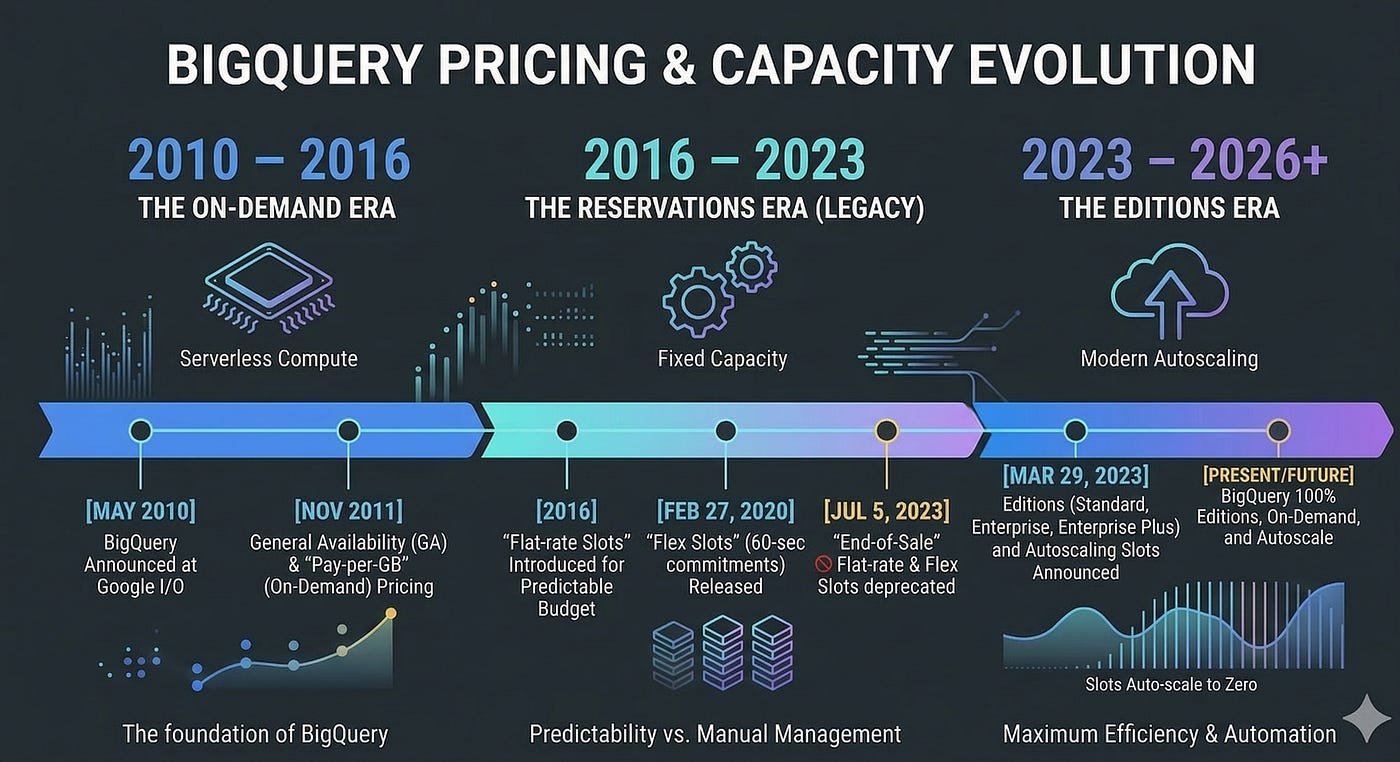
The keen reader here will recognize that the 60 seconds seems very similar to the “minimum” current billing for autoscaler slots on Editions. In fact, the autoscaler is just a rebuilt version of the 60s Flex commitments, so when you are using the autoscaler you are simply under the hood buying a lot of micro-commitments that will last for at least 60 seconds. Prior to the Autoscaler, a few companies actually built their own, very advanced, infrastructure for manually implementing this autoscaling behavior — constantly buying and deleting slot commitments, often multiple times per second, to meet demand. Just like BigQuery’s autoscaler (see highlighted text from BigQuery pricing docs).

Before we move into the next section, it’s again worth pointing out the historical link between commitments and BigQuery editions: they were one and the same. Paying for BigQuery compute and not data scanned was previously only available for the larger enterprises. As time has passed, what the BigQuery team built out to satisfy the requirements for compute-hungry enterprises paying for committed capacity is now BigQuery Editions which bills on pay-as-you-go slots (which, again, are just a series of micro-commitments of at least 60 seconds), or committed capacity for 1 or 3 years.
Ok, this was a bit of a detour perhaps, but I think it’s important to understand the past, to understand the present and where we are going. As you probably understand by now, a BigQuery commitment in the cloud economics sense is an obligation to pay for compute resources (i.e slot capacity) for a foreseeable future. In return for providing predictable revenue to GCP, the cloud provider, you get a discounted rate (like booking an Airbnb for 30+ days).
Normally, however, you do not pay the entire sum upfront, but rather as part of the monthly bill. That being said, a commitment is a legal obligation to pay the entire sum over the commitment period. You cannot cancel a commitment once it has been created, only increase or change it to a higher tier. This makes obvious sense, as anything else would mean you could commit, pay less for some time, and then cancel.
Normally, a commitment in the cloud sense was meant to tackle always on-resources like VMs, databases, a cache or similar. If you knew that your k8s workloads under normal circumstances requires a baseline of 120 CPUs, 1000 GB of RAM and 12 PB of SSDs, you could lock that in for a longer time period and enjoy savings. Now, in some sense, BigQuery commitments and VM resource commitments are the same. You pay for the capacity whether you use it or not. And by the time you lock it in, you can be very confident of what the savings will be: you know that you will save X percent on Y consumption.
However, there’s a crucial difference with BigQuery, and it can bite you pretty hard if you don’t know what you’re doing. All consumption is not created equal. This is where BigQuery’s serverless nature comes into play. You cannot just look at the slot consumption over a specific time (like 1 day, or even 1 hour), find the integral and say “this is how much we should commit to”, since the integral or average will not tell you the full story of your data workloads. The “bite” can come from worse performance, higher cost, or both.
Let’s look at an example. This is obviously an over-simplification but as we will see, it effectively shows why workload patterns are incredibly important to analyzing and leveraging benefits from commitments. Let’s say you are using Autoscaler/PAYG to run your workloads. You see that over a day, you are using 500 slot hours every hour, and this pattern is pretty consistent. The natural reaction would then be to set up a commitment for 500 slots, earning you a nice 20% or 40% discount. Just click “buy” — at least this is how easy it is made to seem.
Now, let’s try to do some math around this. Firstly, let’s look at the slot consumption over 10 windows per hour, i.e. every 6 minutes:

So we see there is some variance here, with a lot of the slot consumption concentrated at the start of midnight — not too uncommon for something like a nightly dbt run. Next, let’s look at the cost:

If we assume this is Enterprise in the EU region, this will be billed at $0.06/slot hour, so an hourly cost of $30, or daily cost of $720. Let’s assume 30 days in a month, then this adds up to a monthly cost of $21,600.
By now, the CFO is beating down your door asking what’s up with that BigQuery bill. And you’re also thinking the same. After a quick look, you tell the CFO that you will immediately set up a 1 year commitment, lowering the cost by 20%. However, you decide to run the numbers just to be sure. This is when it hits you: those commitments are pretty sticky — they are a fixed charge. But since there is a discount, maybe we can get away with those “wasted” slots?

Plotting the cost for this scenario, means that we need to plot the cost of the committed slots (often used as baseline slots in a reservation) and PAYG slots (generally the autoscaler part of a reservation). Unfortunately, at a 1-year commitment and 20% discount, we sum up the cost and we end up with $34.50 per hour! The horror, we are promising our CFO a 20% drop and we may end up increasing the cost by 15%.

In full-blown panic mode you try the last resort — maybe a 3-year commitment will do the trick? At a 40% discount we should see some improvement? Lets see what the charts say:

Yes! We can see that costs, even with waste, seem to be lower now. If we sum it all up, we end up with $28.50 per hour, saving $1.50. However, this is only 5% less than the $30 we are paying — a far cry from the 20% we optimistically promised our CFO.
However, there is a dark side to commitments: as I mentioned earlier, they are a legally binding agreement. From a financial perspective, this can represent a significant liability. Let’s look at the math for our examples. We have established that with a 1 year commitment, and the same pattern, you will lose some money. With a 3 year commitment, the higher discount means that it will be cheaper by a very small margin.
In our imaginary use case, there is some benefit on the 3-year plan. But who has a crystal ball? In general, the only constant is change. With a 1 year commitment, you are contractually obliged to pay 24 hours * 500 slots * $0.048 / slot hour * 30 days = $17,280 billed monthly, which is $207,360 for the year. In addition comes the 10.5 pay-as-you-go slot cost per hour, adding up to 10.5 * 24 * 30 * 12 = $90,720.
With a 3 year commitment, that is $12,960 per month for 3 years, or $466,560 for the committed period. In addition to this comes the pay-as-you-go slot cost at $90,720 per year, or $272,160 (for the avid reader: yes, GCP has some rounding and rules for alternating month length, leap years and such so there will be slight differences as I’m just going with 30 days per month here).
So, looking at these examples, it’s clear that there is no “one size fits all” in terms of commitments. Your job patterns and the changes you need or are willing to make define a lot of the benefits that you will get from a commitment. Now, if you don’t have performance considerations, you can just disable the autoscaler, and let the committed slots do everything — this will work, as long as all your jobs still fit within BQ’s 6 hour limit (or you can start experimenting with batch vs interactive queries for up to 24 hour duration, but at this point you need to ask yourself whether you are fighting the system or working within it).
It’s clear that only relying on commitments in our example will have a massive performance impact. In theory, 1500 slots over 6 minutes will then become 500 slots over 3 6-minute periods, effectively making all the jobs run 3x longer on average! Now, if this is a nightly pipeline, maybe that’s ok, but certainly something to consider before going all-in on commitments and not using pay-as-you-go slots at all. In essence, to benefit from commitments, you need to stop running everything at once, minimize concurrency on reservation/dbt or other orchestration level (e.g. dbt threads). The thing is, to get the full benefit, you need to continuously “binpack” all workloads to fit inside the slot commitment. This means, in terms of our example, continuously using 500 slots every 6 minutes, for every hour.
This is where theory and practice is hard to unify: if dbt needs to run during the night and finish by a certain time, or if all business users are logging on at 9 sharp to start working, you can be pretty certain that they are not going to be too happy that “we are saving money on BigQuery”, if they need to wait minutes for their dashboards to load.
At the end of the day, perfectly binpacked workloads are pretty unrealistic in a real data env where people, tools and jobs are constantly throwing spanners in the “perfect machine”. So in many ways, going for commitments is trading flexibility, both financially and technically, for predictability. And if you do have very stable and long-running job patterns, it can make sense. What we see though, is that a lot of companies are not in such a position.
Now, I’m not trying to paint a completely bad picture here. There are of course instances where commitments do make sense, for instance, if you know that certain systems have distinct, continuous patterns over a longer period of time — go for it. In fact, where we do see some of our customers or companies we talk to have success is by starting small and iterating, i.e 50–100 slots and then slowly adapting workloads.
We also have other observations of companies running really large-scale BigQuery platforms purely on large (and I mean large $$$) capacity commitments, with elaborate setups of 100s of reservations with a combination of idle slot sharing, allowing preemption and extensive slot contention for non-critical use cases. But this also to some extent builds under what I’m trying to say — using and leveraging commitments effectively often means architecting the entire data platform around them, not bolting them on as an afterthought.
If we stick with our example, let’s look at whether we can attack the problem in a different way.
The question now is, if we disregard the problem of budget liabilities alone, have we really gained much by locking in a commitment? If we assume that everything stays the same, a 1 year commitment will lose us money, a 3 year will barely save us anything. Looking again at our chart, we can see that we indeed are using 500 slots per hour in total, even though the momentary usage of that is scattered, causing all the problems with capacity commitments that we went through.
However, there is one more tool we haven’t looked at yet: Committed Use Discounts (CUDs) for BigQuery have a few aces up their sleeve:
So in our simplified case, we would get a 10%/20% discount for 1 / 3-year CUD. Meaning our cost would be $27 vs $24 per hour. This means that a 1-year CUD translates directly into a 10% saving while a 3-year commitment translates into 20%, since there is no overage. 27 * 24 * 30 * 12 = 233,280 vs 24 * 24 * 30 * 12 = $207,360 per year. Contrary to the capacity commitment math outlined above, we would not have any additional pay-as-you-go cost in our case, but if it happens (we don’t have a crystal ball, remember), it would simply be billed at the normal rate, too. Lets look at the chart for our example:

In terms of immediate value vs effort in our example, we can argue that the CUD is better even though the discounts are lower.
Now, in practice, we have not seen CUDs used much yet, which is probably a combination of a few factors. They are relatively new and unknown to most BigQuery users. They were introduced at Cloud Next ’25 (see you there in a few weeks?). It could also be that the savings are not that high vs commitments, so companies may feel that locking in commitments and doing the work to make them worthwhile is a better investment. Either way, as we have shown: there are no free lunches. After all, we are looking at a simple example where the usage is constant at 500 slots every hour.
It’s very important to clarify that due to the structure of our example (hourly), we are getting “perfect” coverage for choosing the CUD amount to match our hourly consumption exactly. In reality, you would probably aim for a CUD that covers an average or lower than average hour, so you are not overcommitted in periods of lower demand. The point of the example was not to decide between different ways of locking in spend, but more to show how the dynamics work. In almost all cases, no environment will be this consistent.
Now, I think it’s also worth mentioning another approach, and one I’m proud to say we pioneered at Alvin. Rather than looking at workloads over a period of time and trying to predict the cost optimal level of commitment or CUD, we make a real-time decision based on known information, such as the query characteristics and current load of the reservation. You can think of this a bit like an exchange, where we find the lowest possible price to execute the query within the SLA.
This is a radically different approach to 3-year commits, and the point of this article is not to say which is better: that, as always, depends on the characteristics of the environment and needs of the business. However I can say from experience that there are many cases where this approach can be cheaper and more performant than commitments, without any lock-in.
Something that really sets BigQuery apart from the other data warehouses is the range of compute options available. We leverage a combination of three PAYG pricing models:

The other huge variable at play that deserves some attention is slot waste. So far, we have mostly discussed the ‘list price’ for slots. But anyone who has used a BigQuery reservation knows that you do not pay the list price for the slots that are actually utilized by your queries. We call the ratio between billed slots and utilized slots the waste factor. E.g. if you have a waste factor of 1.5, for every slot hour your queries utilize, you are actually paying for 1.5, making it 50% more expensive.
A possible side effect of commitments is periods where the reservation is overcommitted i.e. the baseline is above your current slot requirements from workloads, leading to waste. When using PAYG billing models, this is less of a concern, because the BigQuery autoscaler can scale back down to 0 after 1 minute of inactivity. That said the autoscaler can be quite greedy, and scale way up to the max slots config for the reservation, creating waste. So in pursuit of minimizing slot waste, we developed the Autotamer, which continuously adjusts the max slots of the reservation based on historical data and real-time query demand. This helps us keep the billed slots as close as possible to the list price.

So, to sum up this approach, unlike commits we are not limited to the enterprise model and we have more control over waste. Therefore we can generally hit a price per billed slot hour that is below that of a 3 year commitment. Pretty cool, right? For instance, one of our customers was able to reduce their overall GCP yearly commitments across all GCP SKUs by 35%! In our most recent case study , Semrush was able to reduce their BigQuery spend by >60% purely by distributing their workloads dynamically between different pricing models and controlling waste, without a single dollar locked in.
As GCP states itself: capacity pricing is best for constant, long running workloads. In that sense, commitments are an even more extreme version of that. If workloads are constant, continuous, and ALSO with consistent resource demands: capacity commitments make a lot of sense.
We can also use CUDs or even mix and match capacity commitments with CUDs to catch more dynamic “overage” from commitments. But as stated, we are then starting to move into territory where the entire data platform must be architected from the ground-up with this in mind.
By taking on commitments, you are effectively trading flexibility for predictability, and often performance for predictability. This can be worthwhile, if you can identify clear and specific patterns that hold over time — start small!
Whilst I have been as objective as possible in this piece, we have built an alternative approach that leverages automation to give significant cost savings that reflects the reality of most data environments we encounter, without the lock-in. Hit me up on Linkedin if you want to discuss any of the points raised in this article — if I can save you having to get as deep into the BigQuery docs as I have, it will all be worth it!


