

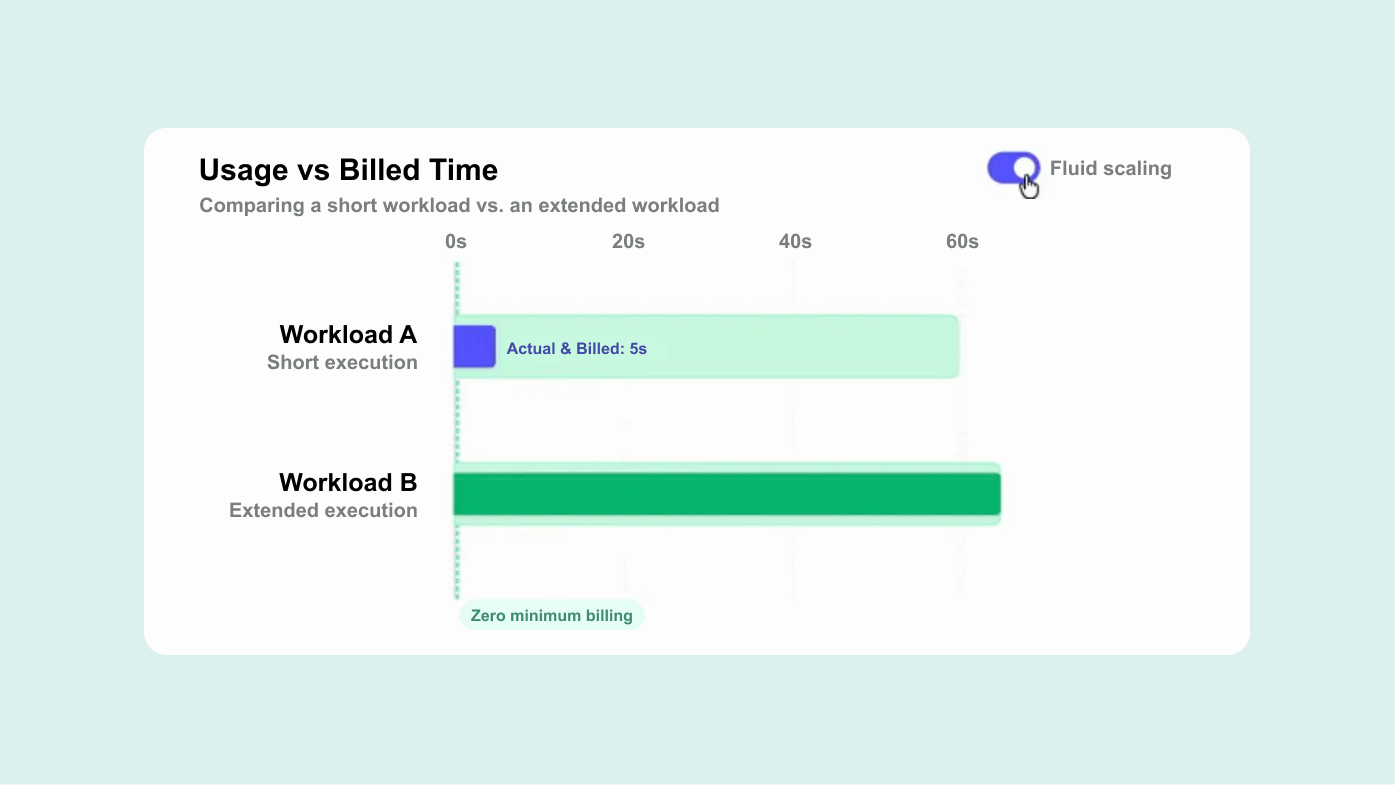
When Fluid Scaling for reservations was announced at Google Cloud Next, I had two reactions at once. The first was excitement, because if it did what the image said, it solved a problem I had been staring at for years. The second was a familiar sinking feeling, because within hours my feed filled up with hot takes.
You know the drill. A “linkedfluencer” who has never seen a BigQuery reservation in their life, three emoji bullet points, a confident claim or two that happened to be wrong, and an AI-generated hero image to top it off. And all of it posted at a moment when there was, quite literally, nothing concrete to say. The announcement said GA, sure, but there were no docs, no release notes, no detail on what had actually changed, when it would be available, or how it behaved. Customers didn’t know. The partners didn’t know. Even the Googlers I spoke to in Vegas had missing or conflicting information. It was scary, fun and exhilariting, all at once!
My colleague Simon Seifer was there with me and was itching to put something out, and his instinct was good: there are very few companies anywhere with Alvin’s density of accumulated BigQuery knowledge, so if anyone should be cutting through the noise, it’s us. But I held off. Until a few weeks ago my information was every bit as patchy as everyone else’s, and I would much rather post nothing than add another confident-but-wrong take to the pile.
Then on June 3rd, the documentation finally appeared. We started testing internally and rolling Fluid Scaling out across our customer environments as we validated it, and now I can actually say something useful, with data behind it.
The one-paragraph version: It works, and it does what it promises. There does not seem to be any good reason not to enable it. The only difference is a change from a complex 60s “minimum” billing to a clean “serverless” per-second billing model. This is pure upside. I’ve seen some claims on LinkedIn that it can be more expensive, but from the basic mechanics of how this works, that seems impossible. I would be very keen to see those calculations. If that is true, it either means the definition of “more expensive” is very different than ours — which is billed vs utilized slot hours, or that someone just got the maths wrong.
But, back to the matter: I don’t want to just throw charts at you, because the interesting bit isn’t the charts — it’s why this is a big deal. And to see that, you have to understand how a reservation bills in the first place.
NB: this section must be read in as if we are pre April 22nd, I think it makes for a better contrast.
Mechanically, a BigQuery reservation behaves much like a Snowflake warehouse. It turns on, and it bills for at least 60 seconds, no matter what your workload actually did in that time. That 60-second floor is the “spanner in the works” for dealing with BigQuery reservations.
If you’ve read my piece on BigQuery capacity commitments and CUDs, this number will ring a bell. Back in 2020, BigQuery introduced Flex slots: slot commitments you could buy for 60 seconds at a time. And the keen reader will already see where this is going — the autoscaler you use on Editions today is, under the hood, just a rebuilt version of those 60-second Flex commitments. Every time it scales up, it’s behind-the-scenes buying a whole series of micro-commitments, each one lasting at least 60 seconds.
It’s commitments all the way down, really. Before the autoscaler existed, a handful of seriously sophisticated teams built their own autoscalers on top of Flex 60s — constantly buying and deleting slot commitments, sometimes several times a second, to chase demand in real time. What those big spenders hand-built at great effort is now a managed feature that everyone gets for free. That has been a great pattern with BigQuery over the years (and even decades): the capabilities once reserved for the largest enterprises keep trickling down to the rest of us as quality-of-life features.
But, the the most important part is to understand wher the autoscaler can bite you. The autoscaler is tuned to preserve performance, not to minimize cost. It scales up fast so your queries stay snappy, and then it holds onto (or at least bills you for) that capacity for the full 60-second minimum before it’s willing to let go. Quick to go up, slow to come down, and that asymmetry is where the waste comes from. And this is particularely problematic for spikey workloads.
Let me make it concrete with a deliberately easy one: One job, executing over three one-second windows:

So the actual work done here is 2,100 slot-seconds. Three seconds, a brief spike in the middle, and then some light IO work like writing results to a temp results table.
But look at what the autoscaler does with it. It sees the spike in W2, scales all the way up to 2,000 slots to serve it — exactly as designed — and then dutifully holds those 2,000 slots for the full 60-second minimum. So instead of billing 2,100, it bills 50 + 2,000 × 60 = 120,050 slot-seconds.

Run the numbers and the waste factor is 120,050 / 2,100 = 57×. Three seconds of real work, billed as very nearly a full minute at maximum capacity. That entire red rectangle is cooldown waste, and this was simply the status quo for reservations.
Now, in fairness, it’s rarely this extreme in practice — with lots of concurrent jobs, overlapping work fills in a good chunk of that held capacity, so you don’t feel the full 57×. But the mechanism underneath is always the same: go high, and stay high for at least 60 seconds, whether you need it or not.
If we stay with the previous example for a little bit: this is how it looked in the old world:

In the new world, we get this:

So we see that the billed area just collapses straight onto the demand curve. You pay for 2,100 slot-seconds instead of 120,050. The waste factor goes from 57× to 1×, and the cooldown tax — paying for 60 seconds you never asked for and never used — is gone. Billing now tracks what you actually consumed, and nothing more.
So one thing are examples and conceptual data. Much better is some actual examples from real environments. The waste factor is an important part of our product. It’s pretty simple once you get the hang of it; it’s the ratio of billed slots to the slots that are consumed by all the jobs using a reservation.
It can be calculated straightforward by doing a second-per-second comparison of the jobs timeline view and the reservation timeline view. If you are, over a day, billed for 10,000 slot hours but the jobs timeline shows only 5,000, your waste factor is 10,000/5,000 = 2. Now, that being said, we are just as bad as anyone else to be consistent with our own nomenclature, so we can also see the waste percentage in some of the following examples. But fear not, they are the sibling of the waste factor. a waste percentage of 60% means that we are billed for 60% of the slots, and only using 40%, so a waste factor of 2.5. I guess I’m sorry that we are using both here, but it just goes to show that noone is perfect (and — the waste percentage is currently an internal tool).

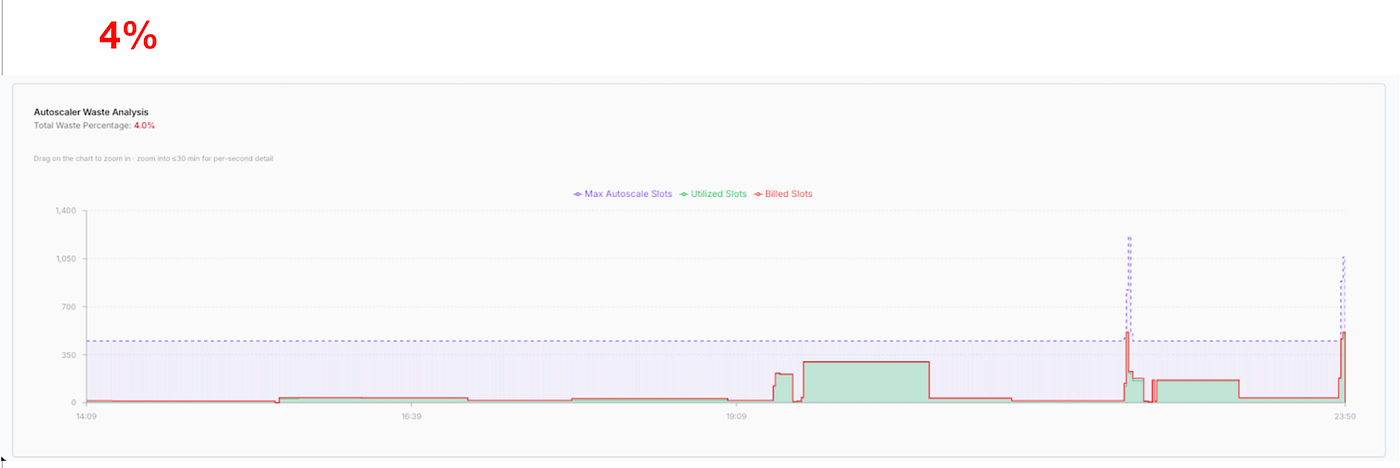
In the above screenshot, we are looking at our waste analyzer plotting the max slots, utilized slots and billed slots. it doesnt take a keen pair of eyes to notice the huge spikes and sustained billed slots — causing a waste of >63%. Now, lets look at the same environment after enabling fluid scaling:

Boom: Waste over a very busy period, where we normally would expect huge waste: 0.6%.
Another environment, we can see a similar pattern as the above: waste sitting at 73.1%.

Enabling fluid scaling — waste at 4%: Now, why not closer to zero? there is a particular reason for this, one is that that the autoscaler still scales in 50 slot increments, and of course there is the full-second billing. But still, impressive.
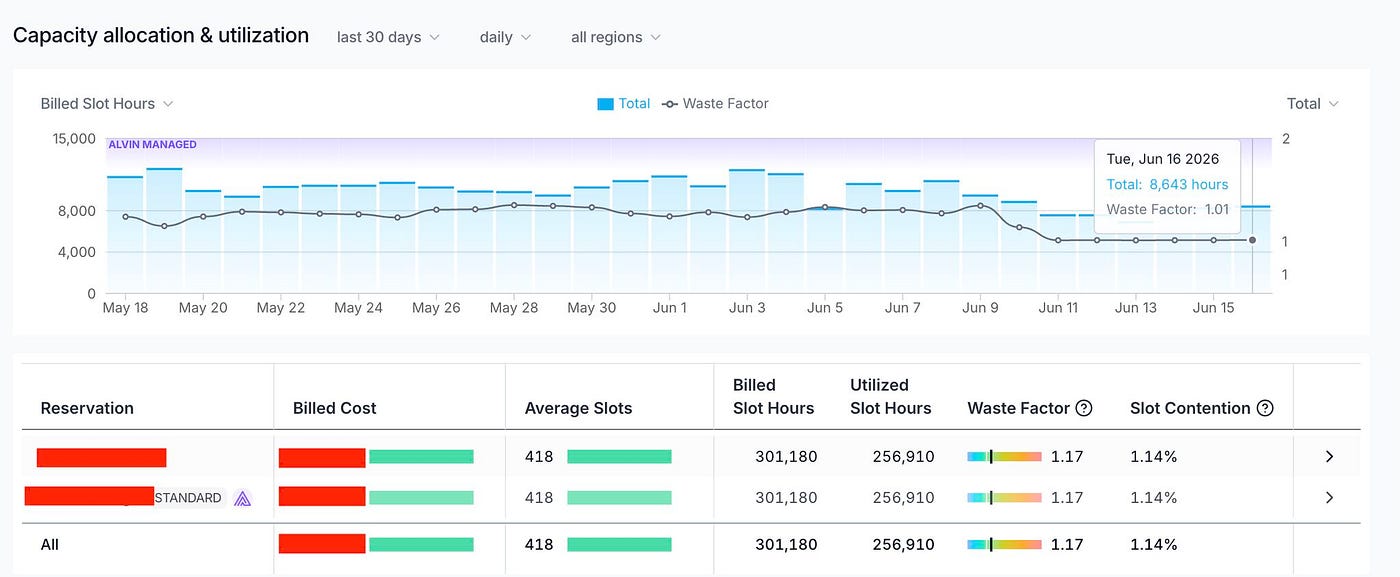
A few more examples, at a more aggregated daily level, showing how the waste factor literally flatlines to 1.01:

I’ve seen some comments from people outside the GCP sphere that seemed very surprised by this move. It’s understandable, but it shows a bit of a shallow understanding of the space. Contrary to Databricks and Snowflake, which live and die by compute consumption steadily increasing (this is no joke, with Snowflake recently facing shareholder lawsuits due to Iceberg impacting their projected revenues), BigQuery is part of the huge GCP platform. We do know that BigQuery users have complained for years about autoscaler waste and hard-to-understand configurations, but I don’t think the GCP people just decided to suddently listen. Or; its a combination. For everyone attending cloud next and GCP’s other meetups this year, there is one mantra: GEMINI (ENTERPRISE). It’s the only thing that matter for the GCP commercial org.
With budgets being more constrained and agents increasingly hammering BigQuery, it does make sense to penalize these spikey workloads less. And ofc, one can just assume that forfeiting some revenue from BigQuery will result in reallocated budgets and increased agentic adoption and overall spend staying the same and increasing.
Once the cooldown tax disappears, reservations suddenly make sense for the smaller and spikier workloads that never worked out on the napkin math before. A bursty pattern — a dashboard that lights up the moment everyone logs on at 9am, all the agents and a handful of ad-hoc queries through the day used to get punished on every single spike. Now it doesn’t.
The cost analysis gets a lot simpler too. A big part of reasoning about BigQuery cost used to be reasoning about whether your capacity was warm: will this query land on slots that are already spun up and billing, or will it trigger a fresh 60-second block? You can mostly stop thinking about that now, which is a genuine relief if you’ve ever tried to model it (we know this probably better than anyone, as doing routing between reservations and on-demand requires a steady hand here).
Put it all together and it reinforces something I’ll happily argue, and probably a hill I would die on: BigQuery is now the only truly serverless data warehouse — on time-to-query, on total cost of ownership, and on feature set. No cold-start problem, no warm-up games, and it scales to any workload without breaking a sweat or the bank.
For Alvin specifically, there’s a twist I find satisfying. Because we manage a large number of customer reservations, we’d already built our own auto-autoscaler — technology that continuously balances waste against performance while routing every single job to its optimal billing model — and we did that long before Fluid Scaling existed, precisely because that 60-second minimum always left something on the table. And mind you, this is not just static cron-based intervals, it is realtime analysis (<1s) over all jobs, and scaling reservations based on signals like slot contention and pre-configures SLAs for query types, users, apps, anything really.
Buit — If I’m honest, we always saw that waste management as a bit of a necessary evil. It worked well, but it was never the main event. The real value driver — the thing our customers actually care about — is making sure every query runs as cheaply as possible, every time, over time. That’s where the savings compound. You can optimize a reservation, or tweak and tune a query, but you cannot make every single looker dashboard and every single dbt model choose the right billing model every single time.
Fluid Scaling now does a lot of that waste-balancing for us, automatically, and that’s great rather than threatening. Our routing gets cleaner, more billing-model variants become viable, the warm-state caveat largely evaporates, and a whole tier of customers who were previously just too small or too spikey to help economically are suddenly in scope.
So that’s what Fluid Scaling actually is — and it turns out to be a good deal less complicated, and a good deal less hyped, than the feed would have had you believe.


